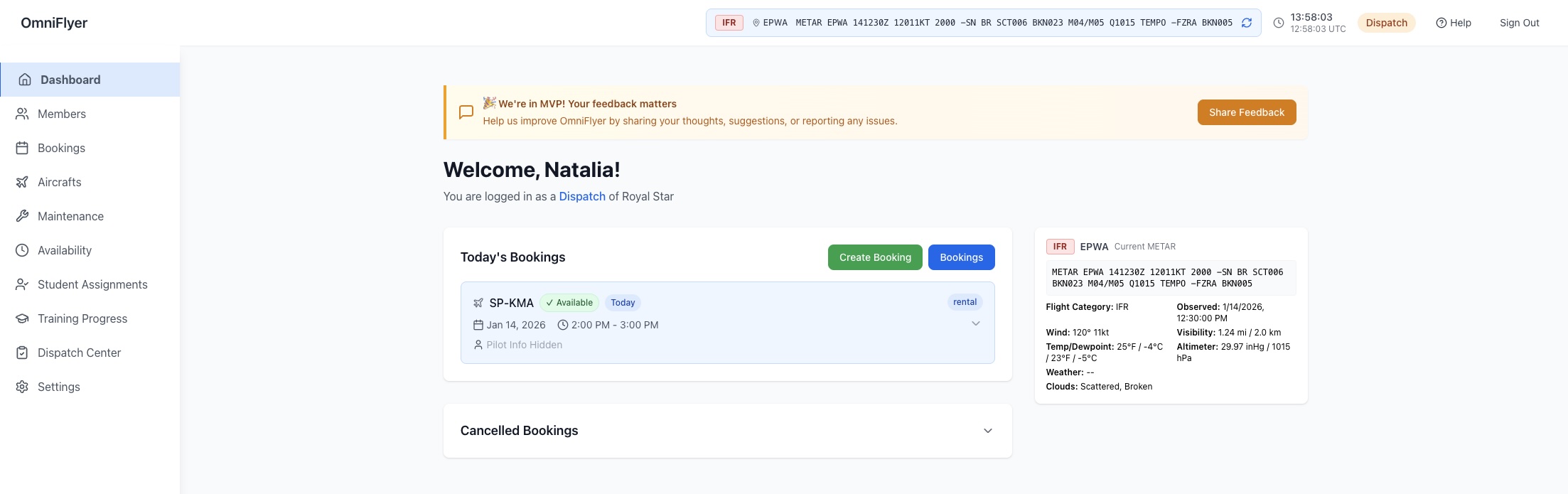
One booking calendar your members can actually trust — no double-bookings, no “is the aircraft serviceable?” phone call.
Built for shared-aircraft clubs that have outgrown a Google Calendar and a spreadsheet, but do not want a system that takes a committee three months to roll out.
Founding Club Program — 5 spots
The first 5 flying clubs get OmniFlyer free for 12 months. We load your aircraft, members, and schedule for you within 24–48 hours — your members just log in and book.
No card, no contract, cancel anytime — in return, a 15-minute feedback call every two weeks.
Most clubs do not start out looking for software. They start with a shared calendar that worked fine at twelve members and one aircraft, and they go looking the week after two members turn up at the same aeroplane on the same Saturday morning.
The reason a calendar fails is structural rather than cosmetic. To a calendar, an aircraft is a word typed into an event title. It has no idea that G-ABCD is one physical object that cannot be in two places at once, no idea that it is out of annual, and no idea that a particular member is not checked out on it. Every one of those rules lives in the head of whoever administers the club — which works right up until that person is on holiday.
Dedicated flying club management software moves those rules out of a person's head and into the system. The aircraft becomes the thing being booked, not a string of text. The club's rules about who may fly what become settings rather than social convention. And the aircraft's condition — hours flown, inspections due, open defects — sits next to the booking calendar instead of in a separate maintenance folder.
That is the whole design brief for OmniFlyer's club product. Not to be the biggest system on the market, but to make the booking calendar tell the truth.

An honest comparison against what most clubs are running today, including the things we do not do yet.
| Capability | Shared calendar + spreadsheet | OmniFlyer |
|---|---|---|
| Double-booking prevention | None — overlapping entries save happily | Overlaps rejected when the booking is made |
| Who may fly which aircraft | Convention, remembered by the committee | Role-based permissions enforced per aircraft |
| Grounded aircraft | A note in the title, if someone remembers | Removed from the calendar automatically |
| Airframe hours | Paper tech log, transcribed later by hand | Updated from each flight's tach and Hobbs entry |
| Defect reporting | WhatsApp message to the maintenance officer | Squawk with photo, tracked to sign-off |
| Inspection due dates | A separate spreadsheet, checked periodically | Monitored and visible beside the aircraft |
| Who changed a booking | Usually unrecoverable | Full audit trail of every change |
| Weather at the field | A separate site or app | Live METAR beside the schedule |
| Setup effort | Already running | We load your fleet and members in 24–48 hours |
| Member billing and invoicing | Manual, in the spreadsheet | Not yet — planned, not shipped |
| Training syllabus tracking | Paper records | Not yet — planned, not shipped |
The last two rows are deliberate. If member invoicing is your most urgent problem, tell us and we will say so rather than sell you a roadmap.
A member picks an aircraft and a window; anything that overlaps an existing reservation is rejected before it is saved. Recurring bookings are supported for members who fly the same slot every week, and the committee can allow or restrict them per role. Live METAR for your base airport sits alongside the calendar so a member can see the weather while choosing a slot.
Checkout requirements, who may book which aircraft, and who can cancel someone else's reservation are configured once and then enforced by the system. When the club secretary hands over, the rules stay put. Every booking and every change is recorded, so a disputed Saturday morning is a lookup rather than an argument.
After a flight the member enters the tach and Hobbs readings from the panel. The aircraft's running total updates immediately, which means the hours the maintenance officer is working from are the hours the aeroplane actually has — not a figure transcribed from a paper log three weeks after the fact.
A member who finds something wrong raises a squawk from their phone and attaches a photo. The maintenance officer sees it immediately, can ground the aircraft — which pulls it out of the booking calendar for everyone — and signs the defect off when it is resolved. Nobody drives to the field to find the aeroplane unserviceable.
OmniFlyer is priced per club and scales with the size of your fleet, not the size of your membership. A club that recruits twenty new members over a season pays exactly what it paid before. We think per-seat pricing is the wrong shape for an organisation whose whole purpose is to add members.
There are no feature tiers. Everything described on this page is included at every level — we are not going to put maintenance visibility behind an upgrade.
The first five clubs to join the Founding Club Program get all of it free for 12 months, with setup done for them. In return we ask for a 15-minute call every two weeks so we can hear what is not working. No card, no contract, cancel whenever.
Full pricing details, or ask us for a quote for your specific fleet below.
If you are a training organisation, our flight school scheduling product is the closer fit.
It is a shared system of record for a club's aircraft, members, and bookings. It replaces the shared calendar and the spreadsheet with one place where members reserve aircraft, the committee sets who may fly what, and everyone can see current airframe hours and maintenance status. The defining feature is that the booking calendar knows about the aircraft: it refuses overlapping reservations and hides aircraft that are grounded.
A shared calendar treats an aircraft as a text label, so nothing stops two members creating overlapping entries, and nothing connects a booking to the aircraft's maintenance state. OmniFlyer treats the aircraft as the resource being booked: overlaps are rejected at the point of booking, grounded aircraft disappear from the calendar, and every flight's tach and Hobbs readings update the airframe total automatically. Our guide to calendars versus dedicated software goes through this in detail.
For founding clubs we do the setup ourselves within 24 to 48 hours. You send a member list and your aircraft registrations, we load the fleet, the members, and the current airframe hours, and your members receive an invitation email. There is no data-entry project for the committee to work through.
Pricing is per organisation and scales with fleet size rather than member count, so growing your membership never increases the bill. All operational features are included at every level. The first five flying clubs to join the Founding Club Program get OmniFlyer free for 12 months in exchange for a 15-minute feedback call every two weeks. See pricing.
Yes. Member self-service is the default for clubs. A member signs in, sees which aircraft are available in the window they want, and books. The system enforces whatever booking rules the committee has configured, so self-service does not mean unmanaged.
Not yet, and we would rather say so plainly. OmniFlyer version 1 covers scheduling, fleet visibility, and flight-time capture. Billing is planned but not shipped. If automated member invoicing is the problem you need solved this month, another product is a better fit today.
Any member can raise a squawk from their phone with a photo attached. An administrator can ground the aircraft, which immediately removes it from the booking calendar, and members holding future bookings can see the aircraft's status. When the defect is signed off, the aircraft returns to service.
No. OmniFlyer runs in the browser on phones, tablets, and desktops. Members sign in at app.omniflyer.com — there is nothing to install and no app-store approval to wait for.
That is a per-club setting. Some clubs want full transparency so members can coordinate directly; others prefer that a booking shows only as a busy block. The committee chooses, and a member always sees their own bookings in full.
Yes. Every query is scoped to your organisation and enforced at the database level rather than in application code, so one club's members cannot reach another club's aircraft, bookings, or member records.
Tell us about your club and we will come back within one working day with either a setup date or an honest reason we are not the right fit yet.