
Flying Club Scheduling Software
A booking calendar that knows what an aeroplane is.
Overlapping reservations are refused rather than flagged. Grounded aircraft disappear from the schedule. Airframe hours update themselves after every flight.
A booking calendar that knows what an aeroplane is.
Overlapping reservations are refused rather than flagged. Grounded aircraft disappear from the schedule. Airframe hours update themselves after every flight.
Every shared calendar can show you who has written down what. That is not the same as scheduling. The distinction that matters is whether the system understands that G-ABCD is a single physical object, or whether it is simply storing the characters you typed.
In a calendar, an aircraft is text. Two members can write the same registration into overlapping events and both will save cleanly. Nothing knows the aeroplane is out of annual. Nothing knows one of those members is not checked out on type. The rules exist, but they live in the club secretary's memory rather than in the software.
In flying club scheduling software, the aircraft is a first-class object with its own state: hours flown, inspections due, defects open, serviceable or not. A reservation is a claim on that object for a window of time. That single change is what makes it possible to reject a conflicting booking, to pull a grounded aeroplane out of the calendar automatically, and to know that the hours the maintenance officer is planning against are the hours the aircraft actually has.
The overlap check runs at the moment the reservation is written, and it runs in the database rather than in the browser. Two members pressing Book on the same aircraft at the same instant cannot both succeed — one of them gets the slot and the other is shown what is already there. A warning dialog you can click through is not conflict prevention.
Members who fly the same Tuesday evening every week create the series once. Each occurrence is conflict-checked on its own, so a single clash three weeks out does not silently overwrite someone else's booking. Committees that want to protect weekend mornings can restrict who may create series at all.
When an administrator grounds an aeroplane it stops being bookable immediately, and members holding future reservations can see why. The alternative — a note appended to a calendar entry that half the club never reads — is how people end up driving to the field for an aircraft that is in pieces.
Who may book which aircraft is a setting, applied per role and per aeroplane. A member who is not signed off on the complex single does not see it offered. Nobody has to police the calendar, and the rule does not evaporate when the committee changes.
The member closes the flight by entering the tach and Hobbs readings off the panel. The airframe total moves at that moment. No transcription from a paper log weeks later, and no divergence between what the tech log says and what the scheduling system believes.
Live METAR for your base airport sits beside the schedule. It will not fly the aeroplane for anyone, but it removes one more reason to leave the page while choosing a slot.
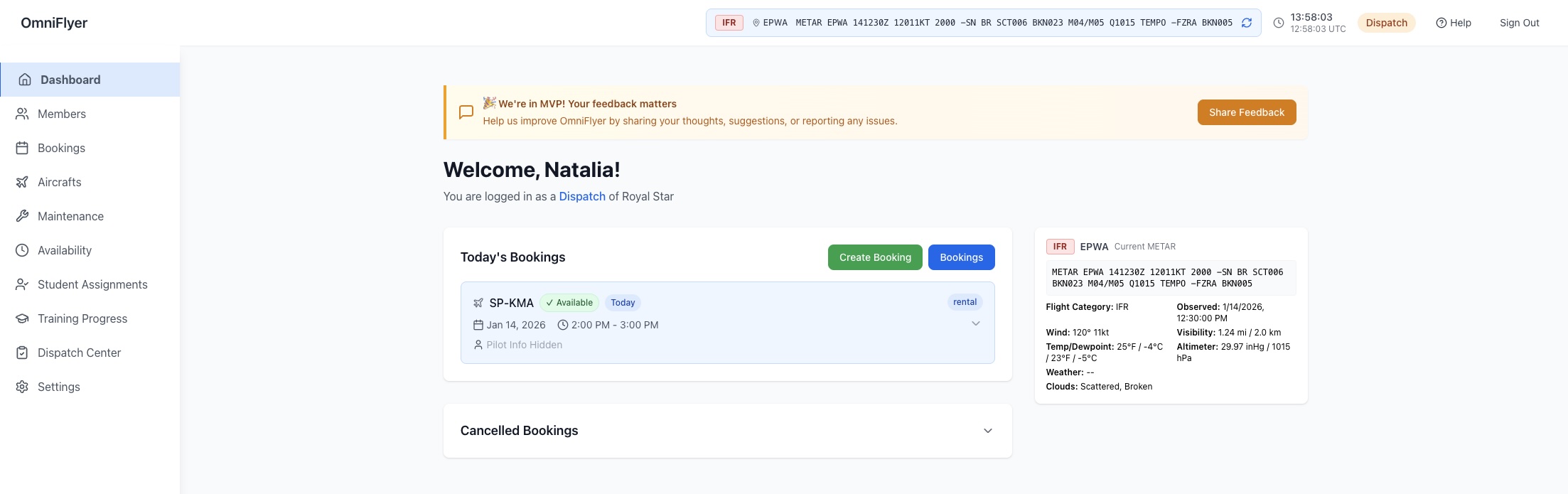
The engine underneath is identical. What differs is who holds booking authority, and getting that wrong is why some clubs bounce off flight-school products and some schools find club tools alarming.
A club is a group of qualified pilots sharing aeroplanes they collectively own. Self-service is the point: a member should be able to take a slot at eleven at night without asking permission. The software's job is to enforce the club's rules quietly in the background.
A school is a training operation where a student is not yet the authority on whether a flight should happen. Dispatch or a CFI approves; students do not self-book. Turning on club-style self-service in that setting is a safety problem, not a convenience.
OmniFlyer ships both postures. If you are a training organisation, start at flight school scheduling instead.
It is a booking system in which the aircraft itself is the resource being reserved, rather than a line of text in a calendar event. Because the system knows which physical aeroplane a reservation refers to, it can reject overlapping bookings outright, hide aircraft that are grounded, and apply the club's rules about who is permitted to fly what.
The overlap check runs when the reservation is saved, not as a warning afterwards. If another member already holds that aircraft for any part of the requested window, the booking is refused and the member is shown what is already there. Because the check is enforced in the database rather than in the browser, two members pressing Book at the same moment cannot both succeed.
Yes. A member who flies the same slot each week can create a booking series in one action, and each occurrence is checked for conflicts individually. The committee controls which roles are allowed to create recurring bookings, so a club that wants to keep weekend mornings open can restrict them.
Grounding an aircraft removes it from the booking calendar immediately, so no new reservations can be made against it. Members holding existing bookings can see that the aircraft is unserviceable rather than discovering it at the field. When the defect is signed off the aircraft returns to the schedule.
Yes. Live METAR for your base airport is shown alongside the schedule, so a member choosing a slot can see current conditions without opening a separate site.
Yes. Booking permissions are role-based and can be set per aircraft, so a member who is not checked out on the complex single simply does not see it as bookable. The rules are configured once and enforced by the system rather than remembered by whoever is on the committee this year.
No. The scheduling calendar runs in the browser on phones, tablets, and desktops. Members sign in at app.omniflyer.com with nothing to install.
Clubs default to member self-service: a qualified member books directly within the club's rules. Flight schools default to dispatch control: students cannot self-book and a CFI or dispatcher approves every flight. The underlying scheduling engine is the same; the difference is who holds booking authority.
We are no longer onboarding flying clubs or flight schools. If you have a question about OmniFlyer or a software problem you want solved, you can find us at Skyway Labs or email hello@skywaylabs.io.